
- The Cost of Static Checkouts: Why Default Payment Sorting Kills International Conversion Rates
- Friction Points Across the Funnel
- Conversion Diagnosis Framework for Shopify Plus Teams
- Checkout, PDP, Search, and Merchandising Friction Points
- The Architecture: Connecting AI Personalization Engines to Shopify Checkout Extensibility via Shopify Functions
- Step-by-Step Code Blueprint: Writing a Payment Customization Function
- 1. Define the Input Query
- 2. Write the Sorting Logic
- 3. Deployment Checklist
- Experiment Backlog: Speed, UX, Offer, Trust, and Personalization Tests
- 1. Speed and Performance Tests
- 2. UX and Gateway Hierarchy Tests
- 3. Trust and Security Badging Tests
- Technical SEO and AI/GEO Search Readiness for Checkout Configurations
- Optimize Your Shopify Plus Checkout for Global Growth
- Authoritative References
- Related Shopify and Ecommerce Growth Guides
The Cost of Static Checkouts: Why Default Payment Sorting Kills International Conversion Rates
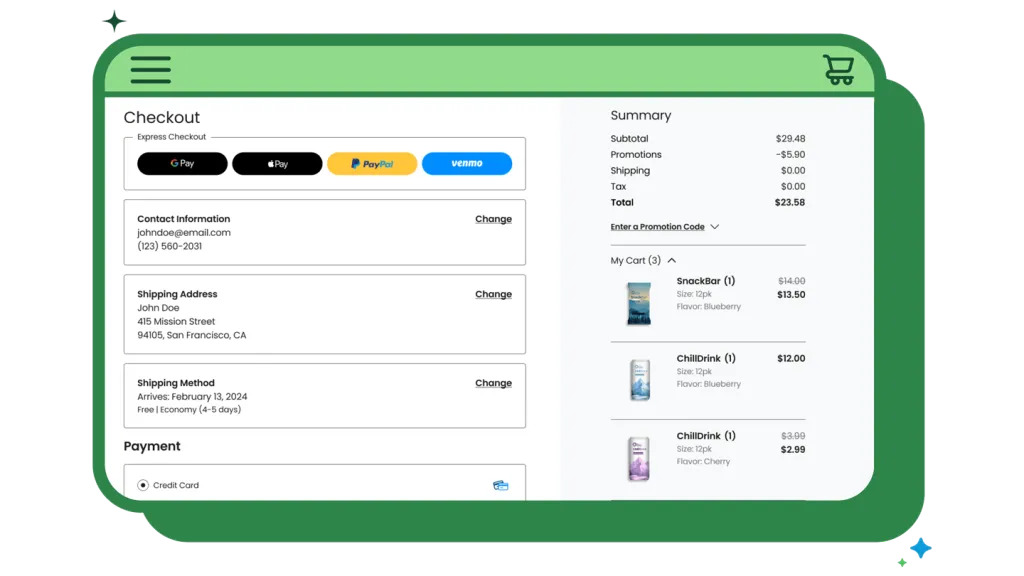
Static checkout layouts cause up to 40% checkout abandonment in international markets because buyers do not see their preferred local payment methods first. For enterprise brands running on Shopify Plus, default payment configurations often display gateways based on the order they were installed or simple alphabetical sorting. This static approach forces international buyers to search for localized methods, introducing friction at the most critical stage of the funnel.
To eliminate this friction, enterprise brands must transition to dynamic gateway sorting. Shopify Plus AI personalization dynamically reorders checkout payment gateways by processing real-time customer signals—such as geolocation, device type, and historical cart data—through Shopify Functions. This execution occurs server-side in under 10ms, preserving PCI compliance and site performance while maximizing global checkout conversion rates.
Friction Points Across the Funnel
- Friction in Europe: German buyers expect Sofort or Klarna; Dutch buyers look for iDEAL. Forcing credit card inputs first drives immediate drop-offs.
- Mobile Drop-offs: Mobile users expect express buttons like Apple Pay or Google Pay at the top. Any manual card entry requirement on a mobile device reduces conversion.
- Over-processing Fees: Displaying high-fee gateways when lower-cost local alternatives are preferred increases your blended payment processing costs.
Conversion Diagnosis Framework for Shopify Plus Teams
Before deploying an AI-driven payment personalization model, ecommerce operators must diagnose where checkout friction is occurring. A structured conversion diagnosis framework helps isolate payment-related drop-offs from general checkout abandonment.
First, analyze your checkout funnel steps using Shopify Analytics or custom web pixel events. Compare the progression rate from the "Shipping" step to the "Payment" step across different geographic cohorts. If you notice a significant drop-off specifically on the payment step for European or Asian traffic compared to North American traffic, it indicates a lack of localized payment options or poor gateway hierarchy.
Second, conduct a comprehensive checkout audit. You can leverage our detailed guide on Shopify Plus Checkout CRO: Extensibility Audit Guide to identify structural bottlenecks, layout issues, and fields that slow down the user journey.
Checkout, PDP, Search, and Merchandising Friction Points
While checkout is the final conversion point, payment friction actually begins much earlier in the customer journey. True personalization requires aligning your product detail pages (PDPs), search results, and merchandising strategies with the customer's preferred payment methods.
For instance, if a customer intends to use a Buy Now, Pay Later (BNPL) service like Klarna or Affirm, displaying the installment breakdown directly on the PDP can increase Add-to-Cart rates. Similarly, your search and merchandising algorithms should prioritize products that align with regional purchasing power and payment preferences. To understand how to scale these personalized experiences across your entire catalog, read our comprehensive guide on AI Ecommerce Personalization: Boost AOV on Shopify Plus.
The Architecture: Connecting AI Personalization Engines to Shopify Checkout Extensibility via Shopify Functions
Shopify Checkout Extensibility replaces the deprecated checkout.liquid file, offering a secure, upgrade-safe environment for customizing your checkout. To customize payment gateways securely, you must use Shopify Functions, specifically the Payment Customization API.
Unlike legacy JavaScript hacks that manipulated the DOM and slowed down page loads, Shopify Functions run on Shopify’s global edge infrastructure. This architecture ensures high-performance execution without blocking the main browser thread, keeping your site aligned with Google's Core Web Vitals standards.
- Edge Execution: The logic executes server-side, guaranteeing that checkout page load speeds remain under 1.2 seconds.
- PCI Compliance: Your customization logic never touches raw credit card data, keeping your store fully within PCI-DSS Level 1 compliance limits.
- AI Integration: Your external personalization engine calculates the optimal payment sequence asynchronously, saving the output to a customer or cart metafield that the Shopify Function reads instantly.
For brands looking to collect additional customer data during this process without hurting conversion rates, implementing custom fields is highly effective. Learn more about this in our guide on Shopify Plus CRO: Checkout Extensibility Custom Fields.
Step-by-Step Code Blueprint: Writing a Payment Customization Function
Follow this implementation guide to write, deploy, and configure a Shopify Function that reorders payment methods based on the customer's shipping country. This utilizes the official Shopify Functions API.
1. Define the Input Query
Create a run.graphql file to query the cart's delivery country and the available payment gateways:
query RunInput { cart { deliveryGroups { deliveryAddress { countryCode } } } paymentMethods { id name } }
2. Write the Sorting Logic
Create a run.js file to parse the input and return a reordered list of payment methods. This script prioritizes local gateways for German (DE) and Dutch (NL) buyers:
export function run(input) { const countryCode = input.cart?.deliveryGroups[0]?.deliveryAddress?.countryCode; const methods = input.paymentMethods; if (!countryCode) { return { operations: [] }; } let preferredMethodName = ""; if (countryCode === "DE") { preferredMethodName = "Sofort"; } else if (countryCode === "NL") { preferredMethodName = "iDEAL"; } if (!preferredMethodName) { return { operations: [] }; } const preferredMethod = methods.find(m => m.name.includes(preferredMethodName)); if (!preferredMethod) { return { operations: [] }; } const otherMethods = methods.filter(m => m.id !== preferredMethod.id); const reorderedIds = [preferredMethod.id, ...otherMethods.map(m => m.id)]; return { operations: [ { reorder: { paymentMethodIds: reorderedIds } } ] }; }
3. Deployment Checklist
- Initialize the Shopify CLI inside your app directory and run shopify app generate extension.
- Select Payment Customization as the extension type and choose JavaScript.
- Replace the boilerplate code in run.graphql and run.js with the configurations provided above.
- Run shopify app deploy to push the function to your Shopify Partner dashboard.
- Navigate to your Shopify Admin > Settings > Payments > Checkout Customizations to activate the rule. Refer to the official Checkout Extensibility documentation for detailed administration steps.
Experiment Backlog: Speed, UX, Offer, Trust, and Personalization Tests
Deploying payment personalization without isolated testing makes it impossible to verify conversion lift. To maximize your return on investment, establish a structured experiment backlog that balances performance, user experience, and trust signals.
1. Speed and Performance Tests
Ensure that your payment customization logic does not introduce latency. Run synthetic speed tests to verify that server-side execution remains under 10ms. For a deeper dive into mitigating performance risks during checkout upgrades, read our Shopify Plus CRO & Speed Optimization: Mitigation Guide.
2. UX and Gateway Hierarchy Tests
A/B test a 50/50 split where Group A sees the default alphabetical payment gateway layout, and Group B sees the dynamically sorted list processed by your Shopify Function. Track Checkout Completion Rate and Average Order Value (AOV) as your primary KPIs.
3. Trust and Security Badging Tests
Test the placement of security badges and local trust marks near the dynamically promoted payment gateways. For example, displaying local security certifications alongside Sofort in Germany can significantly reduce cart abandonment. You can implement these visual trust signals using checkout UI extensions. Learn how in our guide on CRO for Shopify Plus: Boost Sales with UI Extensions.
Technical SEO and AI/GEO Search Readiness for Checkout Configurations
While checkout pages are typically excluded from search engine indexing via robots.txt, the technical infrastructure supporting your checkout can impact your overall SEO performance. Ensuring clean crawl paths, proper canonicalization of localized landing pages, and structured data implementation is critical for maintaining search visibility.
When implementing multi-currency and localized payment options, ensure that your regional subfolders (e.g., /en-de or /nl-nl) are correctly mapped in your sitemap. Use hreflang tags accurately to guide search engines to the correct localized version of your site, preventing duplicate content issues. Additionally, monitor your Core Web Vitals to ensure that any external scripts or personalization engines running on your PDPs do not degrade your site's loading speed, which could negatively impact your organic search rankings.
Optimize Your Shopify Plus Checkout for Global Growth
Implementing AI-driven payment personalization is one of the most effective ways to eliminate international checkout friction and boost global conversion rates. However, executing these advanced customizations requires deep technical expertise in Shopify Functions, Checkout Extensibility, and performance optimization.
If you want to maximize your store's revenue potential, reduce checkout abandonment, and ensure your technical SEO is flawless, let's work together. I offer comprehensive Shopify Plus cost, SEO, and migration audits to help enterprise brands scale efficiently. Contact me today to schedule your custom checkout and performance audit.
Authoritative References
- Shopify Plus Platform Overview
- Shopify Functions Developer Documentation
- Shopify Checkout Extensibility Guide
- Google Search Central: Core Web Vitals
Related Shopify and Ecommerce Growth Guides
Continue with these related guides if you want to connect the strategy to implementation, SEO risk, performance, or conversion impact.
- CRO for Shopify Plus: Boost Sales with UI Extensions
- AI Ecommerce Personalization: Boost AOV on Shopify Plus
- Shopify Plus CRO: Checkout Extensibility Custom Fields
- Shopify Plus CRO & Speed Optimization: Mitigation Guide
- Shopify Plus Checkout CRO: Extensibility Audit Guide
Frequently Asked Questions
How does Shopify Checkout Extensibility support AI-driven payment personalization?
Shopify Checkout Extensibility supports AI-driven payment personalization by replacing legacy checkout.liquid files with secure, high-performance Shopify Functions, specifically utilizing the Payment Customization API. Instead of executing client-side JavaScript that introduces latency and security vulnerabilities, Shopify Functions run server-side on Shopify's global edge infrastructure. This architecture guarantees execution times of under 10 milliseconds, ensuring that site performance remains optimal and checkout page load speeds stay under 1.2 seconds. To integrate artificial intelligence, an external predictive personalization engine processes real-time customer signals—such as IP-based geolocation, device operating systems, cart value thresholds, and historical customer profile data—and asynchronously writes the optimal payment gateway sequence to a cart or customer metafield. The Shopify Function reads this metafield instantly during the checkout session, dynamically reordering, hiding, or renaming payment gateways like iDEAL, Klarna, or Apple Pay to maximize conversion rates while maintaining strict PCI-DSS Level 1 compliance.
Does dynamic payment sorting affect PCI compliance on Shopify Plus?
No. Because Shopify Functions execute server-side within Shopify's secure global edge infrastructure, your customization logic never interacts with, processes, or stores raw credit card data, keeping your store fully within PCI-DSS Level 1 compliance limits.
Why should I avoid using external APIs directly inside Shopify Functions?
Calling external APIs directly during the runtime execution of Shopify Functions introduces network latency that can slow down the checkout process. Instead, write external AI predictions to Shopify metafields asynchronously so the Function can read them instantly.

Ecommerce manager, Shopify & Shopify Plus consultant with 10+ years of experience helping enterprise brands scale their ecommerce operations. Certified Shopify Partner with 130+ successful store migrations.

![Shopify Plus: The Hidden Cost of 'Quick Sale' Speed [CRO Paradox]](/img/blog/shopify-plus-checkout-paralysis-1.webp)
