- Why Standard CRO Agencies Fail on Shopify Plus Checkout Extensibility
- Conversion Diagnosis Framework for Shopify Plus Teams
- Checkout, PDP, Search, and Merchandising Friction Points
- Experiment Backlog: Speed, UX, Offer, Trust, and Personalization Tests
- 1. Speed Experiments
- 2. UX Experiments
- 3. Offer Experiments
- 4. Trust Experiments
- 5. Personalization Experiments
- Implementing Native Shopify Plus Upsells and Cross-Sells via Checkout UI Extensions
- The Problem: Legacy Upsell Apps Slow Down the Checkout
- How to Fix: Deploy Native Checkout UI Extensions
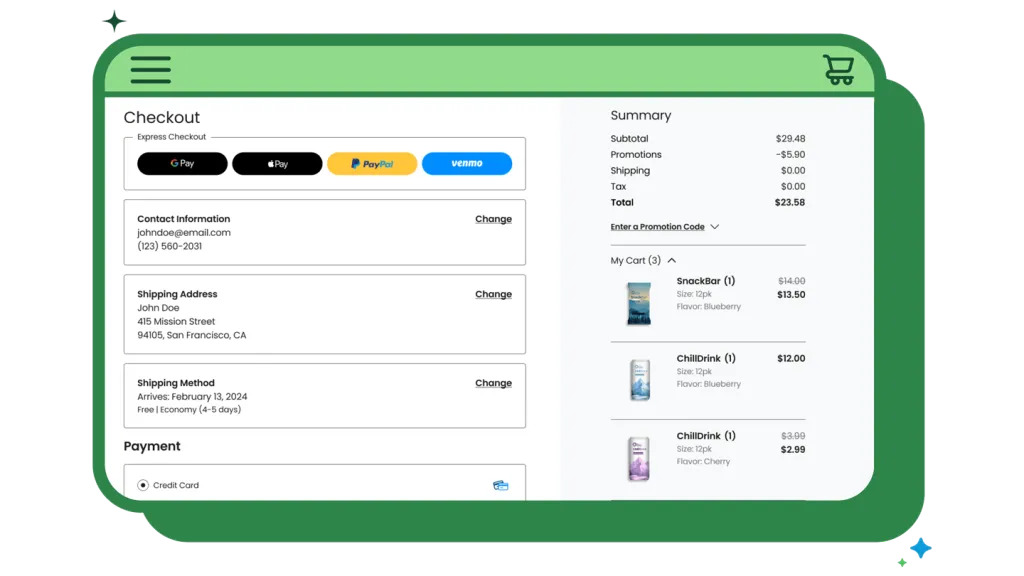
- Optimizing Shop Pay and Express Checkouts for Frictionless One-Click Conversions
- What to Avoid: Common Express Checkout Pitfalls
- Implementation Steps
- Configuring Shopify Pixels and Custom Events for Accurate CRO Attribution
- Vetting CRO Services Shopify Plus: 5 Technical Questions to Ask Your Next Agency Partner
- Get a Technical Shopify Plus CRO and Performance Audit
- Authoritative References
- Related Shopify and Ecommerce Growth Guides

Shopify Plus brands lose millions in leaked checkout revenue because generic optimization tactics break modern Checkout Extensibility and Shop Pay compatibility. This guide provides a technical, native implementation playbook to lift your average order value (AOV) and conversion rate without breaking your checkout architecture.
Why Standard CRO Agencies Fail on Shopify Plus Checkout Extensibility
When evaluating cro services shopify plus brands require specialized solutions that focus on optimizing high-volume checkout flows using native Checkout Extensibility, custom UI extensions, and pixel tracking. Unlike standard CRO, specialized Shopify Plus optimization increases conversion rates and average order value (AOV) without breaking Shop Pay, API integrations, or checkout security protocols.
Standard CRO agencies rely on client-side JavaScript injection and DOM manipulation. On Shopify Plus, Checkout Extensibility blocks external scripts for security, rendering traditional testing tools useless. This sandboxed environment protects customer data but requires a complete shift in how we run experiments.
- Broken API integrations: Generic scripts disrupt the native checkout replacement engine and block backend order processing.
- Shop Pay incompatibility: Custom hacks bypass the accelerated checkout funnel entirely, hurting mobile conversion rates.
- Performance degradation: Heavy third-party tag managers increase latency during critical payment steps, directly impacting your bottom line.
To fix this, technical teams must transition to native Shopify app pixels and custom UI extensions. Read more about deploying these frameworks with our specialized Shopify Plus CRO: Enterprise Audit Framework.
Conversion Diagnosis Framework for Shopify Plus Teams
Before launching any A/B test, enterprise brands must establish a rigorous conversion diagnosis framework. This ensures you are solving real user friction rather than chasing vanity metrics. A technical diagnosis should analyze performance, user behavior, and API latency across the entire purchase funnel.
First, isolate your performance metrics. According to Google's documentation on Core Web Vitals, page speed and visual stability directly correlate with user engagement and conversion rates. Use Shopify's native speed dashboards alongside real-user monitoring (RUM) to identify where latency spikes during the transition from cart to checkout.
Second, segment your conversion data by customer type. If you run a hybrid store, your wholesale buyers will exhibit completely different checkout behaviors than retail consumers. Reviewing your B2B-specific checkout flows is critical; you can learn more about optimizing these high-value funnels in our guide to Shopify B2B Technical SEO: Scale Wholesale Traffic.
Checkout, PDP, Search, and Merchandising Friction Points
Friction points on Shopify Plus typically cluster around four key areas: the Product Detail Page (PDP), site search, collection merchandising, and the checkout flow itself.
On the PDP, friction often stems from slow-loading variant selectors and unoptimized media galleries. If a customer clicks a size or color variant and experiences a half-second delay, they are more likely to bounce. Similarly, generic site search engines that fail to handle typos or synonyms frustrate high-intent buyers.
In the checkout, friction is usually structural. Common culprits include:
- Address validation failures: Lack of autocomplete or rigid field requirements that reject valid international addresses.
- Hidden shipping costs: Displaying shipping fees and taxes only at the final payment step rather than calculating them dynamically.
- Redundant form fields: Forcing users to enter billing and shipping addresses separately when they are identical.
To identify these friction points on your own store, run a comprehensive performance audit. Learn how to evaluate your platform's speed and UX bottlenecks in our CRO Platforms & Shopify Plus Speed: Performance Audit Guide.
Experiment Backlog: Speed, UX, Offer, Trust, and Personalization Tests
A structured experiment backlog keeps your optimization team focused on high-impact tests. Group your experiments into five core pillars: Speed, UX, Offer, Trust, and Personalization.
1. Speed Experiments
Test the removal of non-critical third-party scripts on the PDP and cart pages. Measure the impact of pre-fetching collection pages when a user hovers over navigation links.
2. UX Experiments
Compare a single-page checkout layout against a multi-step checkout. Test the placement of trust badges and security seals directly adjacent to the primary payment input fields.
3. Offer Experiments
A/B test different free-shipping thresholds (e.g., spend $75 vs. $100) and measure the direct impact on AOV and overall margin. Test dynamic tier-based discounting displayed directly in the cart.
4. Trust Experiments
Test the visibility of your return policy and satisfaction guarantees during the shipping selection step. Display real-time customer support options, such as live chat, only to users who exhibit high-hesitation behaviors (e.g., spending more than 3 minutes on the payment page).
5. Personalization Experiments
Serve personalized product recommendations based on the user's geographical location or past purchase history. For a detailed breakdown of how to execute these tests natively, read our guide on Shopify Checkout Extensibility CRO: 7 Tactics to Boost Revenue.
Implementing Native Shopify Plus Upsells and Cross-Sells via Checkout UI Extensions
The Problem: Legacy Upsell Apps Slow Down the Checkout
Older upsell applications hijack the redirect flow, introducing loading spinners and external API calls that cause cart abandonment. These apps often fail to load on slow mobile connections, leaving empty placeholders where your offers should be.
How to Fix: Deploy Native Checkout UI Extensions
Use Shopify's native UI extensions to inject lightweight, server-side rendered upsell modules directly into the information or shipping pages. Because these extensions run on Shopify's secure edge network, they load instantly alongside the core checkout fields.
- Query the Cart API: Pull current line items to dynamically filter out products already in the cart, preventing redundant offers.
- Use Product Recommendations API: Serve personalized, high-margin cross-sells based on the user's cart contents.
- Enforce one-click add: Ensure the "Add to Cart" button executes instantly without reloading the checkout page or redirecting the user.
For complex setup requirements, consider leveraging dedicated technical resources to build custom extension logic. Explore how to build and deploy these components in our technical deep-dive: CRO for Shopify Plus: Boost Sales with UI Extensions.
Optimizing Shop Pay and Express Checkouts for Frictionless One-Click Conversions
Express checkouts like Shop Pay, Apple Pay, and Google Pay can drive up to 60% of your mobile transactions when configured correctly. According to the official Shopify Plus overview, Shop Pay can increase conversion rates by up to 50% compared to standard guest checkouts.
What to Avoid: Common Express Checkout Pitfalls
- Hiding express buttons: Forcing users to click "show more payment options" to see Shop Pay or Apple Pay.
- Double-discounting loops: Allowing automated draft order apps to conflict with express checkout discount codes, leading to broken pricing.
- Ignoring shipping rate mismatches: Failing to pre-populate shipping options, causing unexpected price jumps at the final payment step.
Implementation Steps
- Prioritize Shop Pay: Position the Shop Pay button at the very top of the express checkout container on both the cart and checkout pages.
- Enable guest checkout: Do not force account creation before allowing access to express payment buttons.
- Keep layout clean: Limit express options to the top two or three gateways actually used by your customer demographic to avoid choice paralysis.
Configuring Shopify Pixels and Custom Events for Accurate CRO Attribution
With the deprecation of checkout.liquid, tracking checkout conversions requires Shopify Web Pixels. Standard Google Tag Manager setups often fail to capture accurate event data behind the secure sandbox, leading to under-reported conversions and broken ad attribution.
- Deploy Custom Pixels: Create sandboxed JavaScript environments inside Shopify settings to track custom events securely without exposing customer data.
- Map standard events: Ensure checkout_started, checkout_shipping_info_submitted, and checkout_completed map directly to your ad platforms and analytics tools.
- Prevent double-counting: Disable legacy hardcoded scripts in your theme.liquid files when migrating to Web Pixels to maintain clean data.
By leveraging Shopify's native pixel architecture, you ensure your attribution remains 100% accurate while protecting your site's performance and security.
Vetting CRO Services Shopify Plus: 5 Technical Questions to Ask Your Next Agency Partner
Do not hire an agency that treats Shopify Plus like a standard WooCommerce or custom-built stack. Use these five technical questions to vet potential partners:
- Question 1: How do you run A/B tests on Checkout Extensibility without injecting third-party client-side JavaScript?
- Question 2: Can you demonstrate how your custom checkout UI extensions maintain 100% compatibility with Shop Pay and accelerated checkouts?
- Question 3: How do you utilize Shopify's Web Pixels API to track custom conversion events in a sandboxed environment?
- Question 4: What is your process for optimizing mobile cart-to-checkout speed, and how do you measure checkout latency?
- Question 5: Do your custom checkout solutions require external app hosting, or do they run entirely on Shopify's native edge network using Shopify Functions?
If your agency cannot answer these questions, your checkout performance, security, and API stability are at risk.
Get a Technical Shopify Plus CRO and Performance Audit
Stop guessing why your checkout is leaking revenue. If you are operating a high-volume Shopify Plus store, generic advice won't move the needle. You need a technical, data-driven assessment of your checkout architecture, page speed, and conversion funnel.
We offer a comprehensive, hands-on technical audit designed specifically for Shopify Plus merchants. We will analyze your Checkout Extensibility setup, identify API latency bottlenecks, review your Web Pixels configuration, and build a custom, high-AOV experiment backlog tailored to your brand. Note: Shopify Plus platform fees and contract-specific pricing vary; please verify your specific contract terms directly with Shopify.
Ready to unlock hidden revenue? Contact us today to schedule your technical Shopify Plus CRO and performance audit.
Authoritative References
- Shopify Plus Platform Overview - Official capabilities and enterprise features.
- Shopify Functions Documentation - Technical guide for customizing backend business logic.
- Shopify Checkout Extensibility Guide - Official manual for customizing the secure checkout.
- Google Search Central: Core Web Vitals - Official documentation on web performance and user experience metrics.
Related Shopify and Ecommerce Growth Guides
Continue with these related guides if you want to connect the strategy to implementation, SEO risk, performance, or conversion impact.
- Shopify Plus CRO: Enterprise Audit Framework [2025]
- CRO for Shopify Plus: Boost Sales with UI Extensions
- Shopify B2B Technical SEO: Scale Wholesale Traffic
- Shopify Checkout Extensibility CRO: 7 Tactics to Boost Revenue
- CRO Platforms & Shopify Plus Speed: Performance Audit Guide
Frequently Asked Questions
What is the difference between standard CRO and CRO for Shopify Plus?
Standard conversion rate optimization (CRO) relies heavily on client-side JavaScript injection, DOM manipulation, and third-party testing tools to modify the checkout experience. However, executing CRO for Shopify Plus requires a fundamentally different, native approach due to the deprecation of checkout.liquid and the introduction of Checkout Extensibility. Shopify Plus checkouts run in a highly secure, sandboxed environment that blocks external scripts to protect customer data and payment security. To optimize a Shopify Plus checkout without breaking API integrations, performance, or Shop Pay compatibility, developers must utilize native Checkout UI extensions, Shopify Web Pixels, and server-side rendering. This modern architecture ensures that custom upsells, trust badges, and tracking scripts execute instantly on Shopify's global edge network without causing latency, layout shifts, or cart abandonment, preserving both security and checkout speed for high-volume merchants. By adopting these native solutions, brands can safely run tests and deploy high-converting features without risking transaction failures.
How do you run A/B tests on Shopify Checkout Extensibility?
A/B testing on Checkout Extensibility is executed using native Shopify functions or specialized Shopify Plus apps that leverage the Web Pixels API and custom UI extensions. Because traditional client-side testing tools cannot inject code into the sandboxed checkout, tests must be configured server-side or via native app integrations that dynamically render different UI components based on user segments.
Why does Shop Pay conflict with traditional CRO scripts?
Shop Pay bypasses the standard checkout steps entirely to offer a frictionless, one-click payment experience. Traditional CRO scripts that rely on step-by-step page loads or custom form fields fail to execute during a Shop Pay transaction. To optimize for Shop Pay, brands must use native Checkout UI extensions that are explicitly built to support accelerated checkout funnels.

Ecommerce manager, Shopify & Shopify Plus consultant with 10+ years of experience helping enterprise brands scale their ecommerce operations. Certified Shopify Partner with 130+ successful store migrations.
![Shopify Plus CRO: Enterprise Audit Framework [2025]](/img/blog/shopify-plus-cost-2026-enterprise-pricing-breakdown-1.webp)