

- How to Map ERP Customer Hierarchies to Shopify Plus B2B Company Profiles
- Configuring Custom Price Lists and Volume-Based Discounts Without Code
- Setting Up Net Payment Terms and Vaulted Credit Cards at Checkout
- Managing Blended vs. Dedicated Expansion Stores for D2C and B2B Audiences
- The Blended Store Model (D2C and B2B on One Store)
- The Dedicated Store Model (Separate Expansion Store)
- Integrating ERP Inventory and Order Data via Shopify Plus B2B Admin APIs
- Migrating from the Legacy Shopify Wholesale Channel to Native B2B Features
- Common Migration Mistakes to Avoid
- How to Fix and Execute Your Migration
- Enhancing the B2B Customer Experience
- Optimize Your Shopify Plus B2B Architecture
- Authoritative References
- Related Shopify and Ecommerce Growth Guides
Replicating complex ERP wholesale pricing, customer hierarchies, and net-payment terms within Shopify Plus without disrupting active D2C configurations is a major technical challenge for enterprise merchants. This guide provides a direct, technical blueprint to map your ERP data, configure custom catalogs, and leverage native B2B features to run a highly efficient wholesale operation.
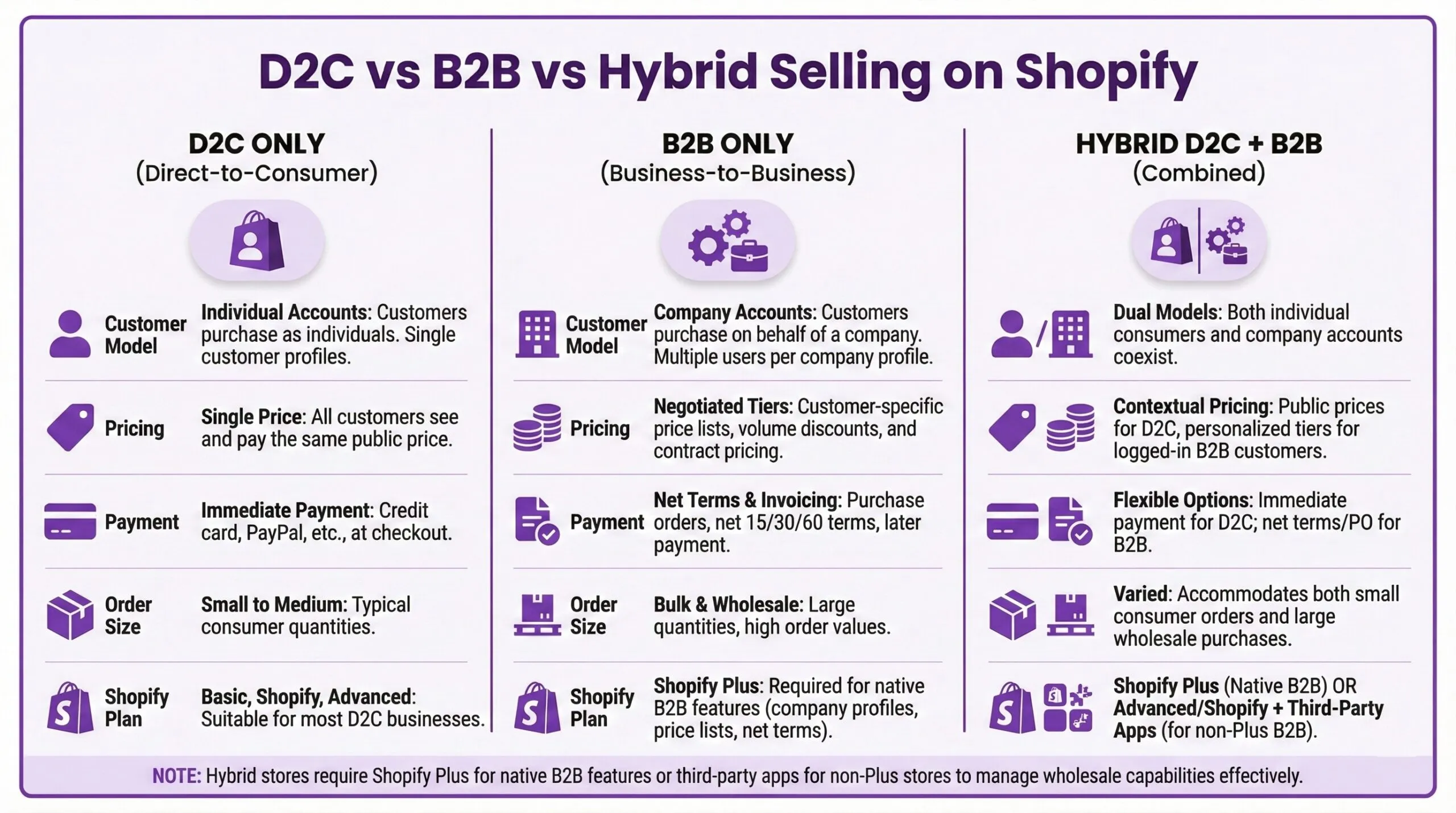
For a high-level platform capability review, refer to the official Shopify Plus overview.
How to Map ERP Customer Hierarchies to Shopify Plus B2B Company Profiles
Shopify Plus B2B allows merchants to map complex ERP customer hierarchies by grouping multiple buyers under a single Company Profile. This structure supports unique locations, dedicated price lists, specific payment terms, and distinct shipping addresses, ensuring seamless alignment between enterprise ERP systems and your Shopify storefront.
To replicate your ERP customer structure, you must map your database fields to Shopify's three-tier B2B hierarchy:
- Company: Represents the overall corporate entity or parent account in your ERP.
- Company Location: Maps to specific physical branches, franchises, or regional offices, each with its own tax ID and shipping address.
- Customers (Contact): Individual buyers associated with specific locations, granted specific permissions like "ordering only" or "administrator".
This native mapping eliminates the need for complex custom middleware or tag-based hacks that historically slowed down database queries and degraded storefront performance.
Configuring Custom Price Lists and Volume-Based Discounts Without Code
Shopify Plus allows you to manage wholesale pricing natively without relying on complex tag-based apps or custom theme workarounds. This is highly beneficial for maintaining clean theme code and avoiding performance bottlenecks.
To configure custom pricing and volume breaks, follow this setup checklist:
- Navigate to the Price Lists section in your Shopify admin to start configuration.
- Click the action item to create a price list and define your pricing adjustment.
- Upload a CSV file if you need to set SKU-specific fixed prices instead of blanket percentage discounts.
- Under the volume pricing section, add quantity breaks by entering the minimum quantity and the discounted price per unit.
- Link the price list to the specific company location profiles that qualify for the rates.
Key operational capabilities of native price lists include:
- Setting percentage-based price decreases across entire collections or the entire catalog.
- Setting fixed B2B prices per SKU that completely override the retail price.
- Implementing tiered volume discounts, such as offering 10% off for 50+ units, or 20% off for 100+ units.
- Displaying the volume pricing table directly on the product detail page for authenticated B2B customers.
For a deeper dive into optimizing these catalogs for search engines and user experience, read our guide on Shopify B2B Optimization: Scaling Wholesale on Shopify Plus.
Setting Up Net Payment Terms and Vaulted Credit Cards at Checkout
Managing cash flow and credit terms is critical for B2B transactions. Shopify Plus supports native payment terms directly within the checkout flow. You can assign terms to specific company locations to control how and when buyers pay:
- Assign terms like Net 15, Net 30, Net 45, Net 60, or Net 90 to trusted accounts.
- Buyers can checkout with $0 due at the time of order placement.
- Draft orders are automatically generated, and invoices are emailed with a link to pay online when due.
To secure automated payments, you can enable vaulted credit cards:
- Buyers store a credit card securely on file during their initial checkout.
- The merchant can automatically charge the vaulted card once the Net 30 or Net 60 term expires.
- This reduces manual accounts receivable chasing and lowers Days Sales Outstanding (DSO).
Note: While native payment terms are highly configurable, transaction fees and contract-specific pricing can vary. Merchants should verify their specific contract-specific pricing and terms directly with Shopify.
Managing Blended vs. Dedicated Expansion Stores for D2C and B2B Audiences
Choosing the right store architecture impacts your long-term maintenance overhead, SEO strategy, and system integrations. When migrating legacy systems to a dedicated B2B environment, utilizing a professional migration strategy ensures zero downtime for existing D2C channels.
The Blended Store Model (D2C and B2B on One Store)
Pros: Single inventory pool to manage; unified theme and codebase; shared apps and admin settings.
Cons: Complex theme logic needed to hide retail-only elements; risk of exposing B2B pricing via public APIs; potential impact on page speed if not optimized correctly. To mitigate speed issues, refer to our guide on Shopify Total Blocking Time Fix: 6 Steps to Faster Themes.
The Dedicated Store Model (Separate Expansion Store)
Pros: Completely isolated catalog, pricing, and checkout experience; distinct ERP integration endpoints; zero risk of D2C/B2B conflict.
Cons: Requires managing two separate themes; inventory must be synced across two distinct Shopify stores.
For a detailed breakdown of how to transition your architecture, consult the Shopify Plus Wholesale Channel Migration Guide.
Integrating ERP Inventory and Order Data via Shopify Plus B2B Admin APIs
To automate operations, you must integrate your ERP (such as SAP, NetSuite, or Microsoft Dynamics) with Shopify using the GraphQL Admin API. Use the following API endpoints and objects to maintain real-time sync:
- Company and CompanyLocation Objects: Use these to programmatically create, update, or delete B2B corporate profiles from your ERP.
- PriceList and PriceListPrice Mutations: Push ERP-calculated custom pricing directly to Shopify, bypassing manual admin uploads.
- PurchasingCompany Object: Query this object during order creation to identify which B2B account placed the order for accurate ERP routing.
To maintain high API performance, always use the GraphQL Admin API version 2023-04 or later to batch price list updates and avoid rate limits.
Migrating from the Legacy Shopify Wholesale Channel to Native B2B Features
The legacy Shopify Wholesale Channel is being phased out in favor of native B2B features built directly into the core Shopify online store.
Common Migration Mistakes to Avoid
- Relying on customer tags to restrict access. Native B2B uses Company Profiles, not customer tags, to control visibility.
- Migrating without checking theme compatibility. Older Shopify themes do not support B2B components like quick order lists and company selectors.
- Overlooking draft order API limits when pushing heavy B2B order volumes from external ERPs.
How to Fix and Execute Your Migration
- Step 1: Audit your current customer tags and export them into a clean CSV mapped to ERP account numbers.
- Step 2: Upgrade your storefront to an Online Store 2.0 theme to natively support B2B elements.
- Step 3: Use the Shopify Bulk Importer or Admin API to create Company Profiles and assign Location-specific Price Lists.
- Step 4: Run parallel testing in a sandbox environment to verify that B2B customers see correct wholesale pricing while public guests see retail pricing.
To ensure your migrated store continues to capture organic search demand without losing rankings, implement the strategies outlined in our guide on Shopify B2B Technical SEO: Scale Wholesale Traffic.
Enhancing the B2B Customer Experience
Modern wholesale buyers expect a frictionless, personalized shopping experience similar to D2C. By leveraging machine learning and tailored product recommendations, you can significantly increase average order value (AOV). Learn more about implementing these strategies in our guide on AI Ecommerce Personalization: Boost AOV on Shopify Plus.
Optimize Your Shopify Plus B2B Architecture
Migrating to or optimizing Shopify Plus B2B requires deep technical expertise to avoid ERP sync errors, checkout friction, and SEO traffic loss. Whether you need to audit your current setup, plan a legacy wholesale migration, or optimize your store's performance, we can help. Contact us today for a comprehensive Shopify Plus B2B, SEO, or migration audit to ensure your enterprise wholesale operations run flawlessly.
Authoritative References
For official platform documentation and technical specifications, please refer to the following resources:
- Shopify Plus Overview - Official platform capabilities and enterprise features.
- Shopify B2B Documentation - Detailed setup guides for companies, price lists, and payment terms.
Related Shopify and Ecommerce Growth Guides
Continue with these related guides if you want to connect the strategy to implementation, SEO risk, performance, or conversion impact.
- Shopify B2B Technical SEO: Scale Wholesale Traffic
- Shopify B2B Optimization: Scaling Wholesale on Shopify Plus
- AI Ecommerce Personalization: Boost AOV on Shopify Plus
- Shopify Total Blocking Time Fix: 6 Steps to Faster Themes
- Shopify Plus Wholesale Channel Migration Guide
Frequently Asked Questions
How does Shopify Plus B2B handle ERP customer hierarchy mapping?
Shopify Plus B2B structures complex enterprise ERP customer hierarchies using a native three-tier architecture: Companies, Company Locations, and Customers (Contacts). The "Company" represents the primary corporate parent entity in your ERP database. The "Company Locations" map directly to physical branches, retail franchises, or regional offices, allowing merchants to assign unique tax IDs, shipping addresses, and localized price lists to specific locations. Finally, the "Customers" represent individual buyers or procurement agents who are linked to specific locations with granular, role-based permissions such as "ordering only" or "administrator." By leveraging this native structure, enterprise merchants can programmatically sync multi-tiered accounts from ERP systems like NetSuite, SAP, or Microsoft Dynamics via the Shopify GraphQL Admin API. This eliminates the need for legacy customer tags or complex theme workarounds, ensuring seamless data flow, accurate wholesale pricing, and automated tax compliance across all B2B sales channels.
Can you run B2B and D2C on the same Shopify Plus storefront?
Yes. Shopify Plus supports a blended store model where both D2C and B2B customers share the same storefront. B2B customers log in to access custom price lists, net payment terms, and wholesale catalogs, while public visitors see standard retail pricing.
What happens to the legacy Shopify Wholesale Channel?
The legacy Shopify Wholesale Channel is being deprecated in favor of native B2B features built directly into the core Online Store 2.0 architecture. Merchants must migrate to Company Profiles and native Price Lists to maintain compatibility and access new features.

Ecommerce manager and Shopify Plus consultant helping teams plan migrations, improve storefront performance and review conversion opportunities.

