
![Shopify Plus Consultant: Scale to $100M ARR [Guide] Cover Image](/img/blog/scale-to-10m-shopify-plus-ecommerce-growth-1.webp)
- Why the $10M to $100M ARR Transition Breaks Standard Shopify Plus Setups
- Shopify Plus Consultant vs. Agency Alternative: Cost, Speed, and Resource Allocation
- Optimizing Shopify Plus Architecture for High-Volume Transaction Spikes and Checkout Extensibility
- What to Avoid (Common Checkout Mistakes)
- How to Fix (Step-by-Step Checkout Migration)
- Integrating ERPs, WMS, and 3PLs Without Data Sync Failures at Scale
- What to Avoid (Common Integration Mistakes)
- How to Fix (Implementation Framework)
- International Expansion and Wholesale: Managing Multi-Store Architectures
- Actionable Framework: How to Vet and Hire a Shopify Plus Consultant for $100M ARR Scaling
- Get a Technical Shopify Plus Audit
- Related Shopify and Ecommerce Growth Guides
- Authoritative References
Scaling a D2C brand from $10M to $100M ARR exposes critical technical bottlenecks in standard Shopify Plus setups, from broken ERP syncs to slow checkout performance. This guide provides the exact architectural frameworks and execution steps to eliminate these bottlenecks without paying for bloated agency overhead.
Why the $10M to $100M ARR Transition Breaks Standard Shopify Plus Setups
A Shopify Plus consultant is an independent technical architect who diagnoses, optimizes, and scales enterprise-level Shopify configurations. Unlike generalist agencies, they specialize in custom API integrations, checkout extensibility, ERP synchronization, and high-volume performance tuning to prevent operational failure during rapid scaling phases.
At $10M ARR, standard Shopify setups begin to hit hard operational limits. Third-party apps that rely on heavy frontend JavaScript slow down your site speed, directly depressing your conversion rate. To identify and resolve these performance bottlenecks, executing a systematic Shopify app audit is essential to eliminate script bloat.
API rate limits become a constant bottleneck as inventory updates, order processing, and customer data syncs compete for the same API call allocations. Legacy configurations like checkout.liquid fail to support modern, high-volume transactional needs.
- API Rate Limit Exhaustion: Standard Shopify REST APIs throttle under high order volumes, causing delayed order processing and inventory sync lags.
- App Bloat and Latency: Relying on too many third-party apps injects render-blocking JavaScript, dragging down mobile load times and hurting your overall Shopify Plus conversion strategy.
- Legacy Checkout Limitations: Older checkout.liquid setups prevent deep customization and do not support Shopify's latest security and feature updates.
Shopify Plus Consultant vs. Agency Alternative: Cost, Speed, and Resource Allocation
Traditional agencies carry heavy overhead, forcing you to pay for account managers, sales representatives, and bloated project management layers. This structure slows down technical execution when you need immediate architectural fixes.
An independent technical consultant works directly with your internal development or operations team, eliminating communication layers. This direct model reduces project delivery timelines from months to days.
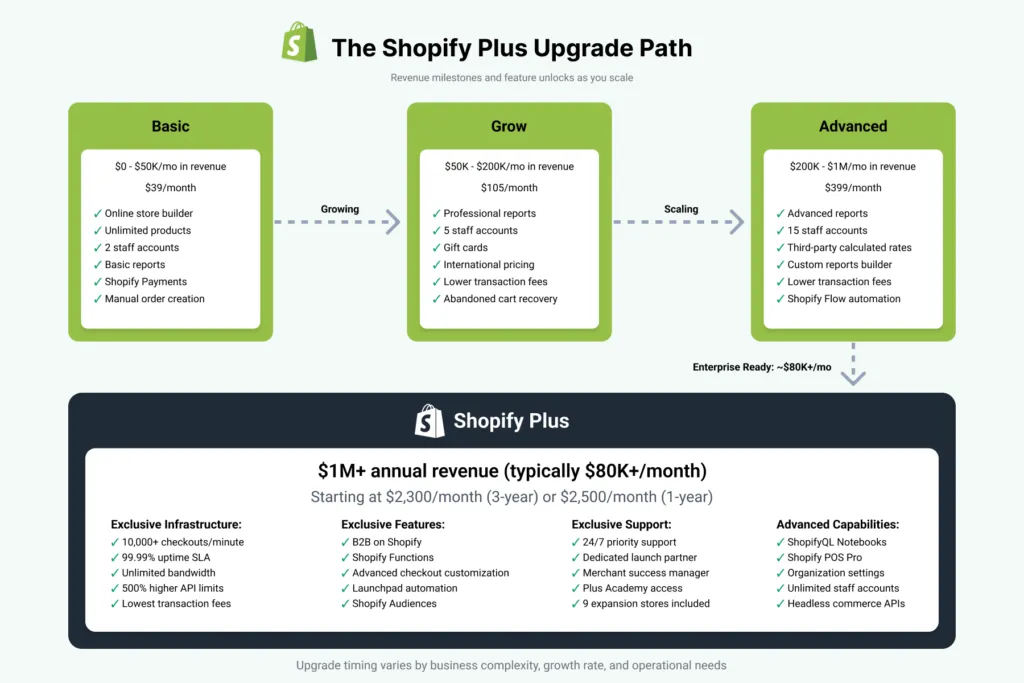
When evaluating the financial aspect of the platform, remember that licensing fees and transaction costs scale with your volume. It is critical to verify contract-specific pricing directly with Shopify, as custom enterprise agreements can vary based on your GMV and specific business requirements. Refer to the official Shopify Plus platform overview for the latest baseline terms.
- Cost Efficiency: Eliminate the 40% to 60% agency markup and pay exclusively for senior-level technical execution.
- Execution Speed: Direct communication with a technical expert removes administrative bottlenecks, allowing rapid deployment of code and integrations.
- Strategic Focus: Consultants focus on high-impact infrastructure upgrades, such as custom Shopify theme optimization, rather than billing hours for low-value tasks.
Optimizing Shopify Plus Architecture for High-Volume Transaction Spikes and Checkout Extensibility
High-volume transaction spikes during product drops or seasonal sales can overwhelm unoptimized checkouts, leading to lost revenue. Upgrading to Shopify Checkout Extensibility is required to maintain stability and unlock advanced customization. Implementing modern Shopify Checkout Extensibility CRO tactics ensures your checkout remains optimized for conversions while maintaining maximum security.
Using custom Shopify Functions allows you to run complex discount, shipping, and payment logic directly on Shopify's infrastructure. This setup ensures your checkout remains fast and functional under extreme traffic loads.
What to Avoid (Common Checkout Mistakes)
- Using legacy checkout.liquid: This deprecated system limits customization and has been phased out by Shopify for standard checkout pages.
- Relying on client-side tracking: Client-side scripts fail to capture accurate data due to ad blockers and browser privacy restrictions, degrading your Shopify CRO consulting efforts.
- Hardcoding checkout customizations: Hardcoded scripts break easily during platform updates and slow down checkout load times.
How to Fix (Step-by-Step Checkout Migration)
- Step 1: Audit your current checkout.liquid file to identify all active tracking scripts, custom fields, and styling.
- Step 2: Rebuild custom checkout logic using Shopify Functions to handle complex discounts and shipping rules server-side.
- Step 3: Deploy Shopify Pixels to handle marketing and analytics tracking securely through a sandboxed environment.
- Step 4: Use Checkout UI Extensions to add custom elements like upsells, trust badges, or gift messages directly into the checkout flow.
Integrating ERPs, WMS, and 3PLs Without Data Sync Failures at Scale
As order volume grows, real-time sync errors between Shopify and your Enterprise Resource Planning (ERP) system can cause overselling and fulfillment delays. Standard out-of-the-box connectors often fail when processing hundreds of concurrent orders.
To scale reliably, you must implement a robust middleware layer or utilize Shopify's GraphQL Admin API bulk operations. This ensures data is queued, validated, and processed without hitting rate limits.
What to Avoid (Common Integration Mistakes)
- Point-to-point integrations: Connecting Shopify directly to your ERP without a middleware layer creates a brittle system where one API failure breaks the entire chain.
- Real-time inventory sync for all SKUs: Syncing entire catalogs in real-time exhausts your API limits rapidly; only high-velocity SKUs require instant updates.
- Lack of automated error-handling: Failing to implement automated retry mechanisms means failed syncs require manual intervention to resolve.
How to Fix (Implementation Framework)
- Step 1: Implement an integration middleware layer (such as Celigo, custom AWS serverless functions, or Shopify Flow) to queue and throttle API calls.
- Step 2: Transition your integration from REST APIs to Shopify's GraphQL Admin API to utilize bulk operations for inventory and order data.
- Step 3: Configure automated webhooks with a queue system (like AWS SQS) to handle and retry failed data transmissions automatically.
- Step 4: Set up real-time monitoring and alerting via Slack or email to notify your operations team the moment an integration sync fails.
International Expansion and Wholesale: Managing Multi-Store Architectures
Scaling globally or expanding into wholesale channels requires choosing between a single-store setup using Shopify Markets or a multi-store architecture with separate Shopify instances. The wrong decision can drastically increase your administrative overhead or limit your localization capabilities. If you are scaling wholesale operations, implementing tailored Shopify B2B technical SEO strategies is critical to capturing high-intent search traffic.
For brands with complex, localized inventory setups across global 3PLs, a multi-store approach is often necessary. For simpler setups, Shopify Markets provides a unified backend to manage multiple regions efficiently.
- Shopify Markets (Single Store): Best for brands looking to centralize inventory, products, and customer data in one dashboard while offering localized currencies and languages.
- Multi-Store Expansion: Essential for brands that require independent localized inventories, separate legal entities, unique marketing strategies, or localized payment gateways.
- Migration Strategy: If your current setup is unmanageable, utilize a structured Shopify migration service to consolidate or split your store databases without losing historical customer data.
Actionable Framework: How to Vet and Hire a Shopify Plus Consultant for $100M ARR Scaling
Hiring the wrong technical resource can result in broken integrations, site downtime, and wasted budget. Use this structured vetting framework to evaluate candidates for enterprise-level scaling projects.
- Verify GraphQL and API Rate Limit Expertise: Ensure the consultant can explain how they design systems to bypass Shopify API rate limits during high-volume events.
- Audit Checkout Extensibility Portfolio: Ask for live examples of enterprise brands they have migrated from checkout.liquid to Checkout Extensibility.
- Review Integration Architecture Diagrams: Request to see sanitized system architecture diagrams of ERP, WMS, or 3PL integrations they have personally built.
- Check Performance Optimization Metrics: Ask for before-and-after Core Web Vitals reports demonstrating how they improved mobile page speed on high-volume stores.
- Test for Direct Execution: Confirm they will write the code and design the architecture themselves, rather than outsourcing the work to junior offshore developers.
Get a Technical Shopify Plus Audit
Are you ready to scale your Shopify Plus store to $100M ARR without the operational headaches? Let's identify your technical bottlenecks, optimize your checkout performance, and streamline your ERP integrations. Contact me today for a comprehensive Shopify Plus cost, SEO, or migration audit to ensure your store is built for enterprise-grade growth.
Related Shopify and Ecommerce Growth Guides
Continue with these related guides if you want to connect the strategy to implementation, SEO risk, performance, or conversion impact.
- Shopify Plus Conversion Strategy: UX, Speed & CRO
- Shopify Checkout Extensibility CRO: 7 Tactics to Boost Revenue
- Shopify B2B Technical SEO: Scale Wholesale Traffic
- CRO Platforms & Shopify Plus Speed: Performance Audit Guide
- Shopify App Audit: 5 Steps to Fix Site Speed & Script Bloat
Authoritative References
Use these official resources to verify platform-specific claims and implementation details before making commercial or technical decisions.
Frequently Asked Questions
What is the difference between a Shopify Plus consultant and a traditional agency?
An independent Shopify Plus consultant acts as a direct technical architect, offering a lean, high-performance Shopify Plus agency alternative for enterprise brands. While traditional agencies carry significant overhead from account managers, sales representatives, and multi-layered project management teams—often resulting in a 40% to 60% markup—an independent consultant works directly with your internal development and operations teams. This direct communication model eliminates administrative bottlenecks, reducing technical deployment timelines from months to days. Strategically, a consultant focuses on high-impact infrastructure upgrades, such as custom Shopify Functions, GraphQL API rate limit mitigation, and server-side checkout extensibility migrations. In contrast, agencies often prioritize billing hours for low-value, templated design tasks. By bypassing agency bloat, scaling brands secure senior-level technical execution, ensuring that complex ERP integrations, real-time inventory synchronization, and global multi-store architectures are built for maximum throughput and long-term operational stability.
Why must high-volume brands migrate away from checkout.liquid?
Shopify is deprecating checkout.liquid. High-volume brands must migrate to Checkout Extensibility to maintain checkout stability, access native Shopify Functions, and deploy secure Checkout UI Extensions without risking site performance or breaking core checkout flows during platform updates.
How does a Shopify Plus consultant resolve ERP integration sync failures?
A consultant resolves sync failures by replacing brittle point-to-point connections with robust middleware layers, migrating REST API integrations to Shopify's GraphQL Admin API, and setting up automated queueing systems (like AWS SQS) to handle and retry failed transmissions.

Ecommerce manager, Shopify & Shopify Plus consultant with 10+ years of experience helping enterprise brands scale their ecommerce operations. Certified Shopify Partner with 130+ successful store migrations.
![Shopify Plus CRO: Enterprise Audit Framework [2025]](/img/blog/shopify-plus-cost-2026-enterprise-pricing-breakdown-1.webp)
![Shopify CRO Audit: Fix Mobile Cart Drop-Off [70% Recovery]](/img/blog/ai-cart-recovery-shopify-plus-2.webp)
