- Conversion Diagnosis Framework for Shopify Plus Teams
- Auditing Mobile Navigation and Search Friction
- Optimizing Product Detail Pages (PDP) for Mobile-First Thumb Zones
- Mobile PDP Implementation Checklist
- Reducing Friction in Shopify Plus Checkout Extensibility
- Technical Performance Audit: Mobile LCP and CLS Optimization
- Mobile Personalization Audit via Shopify Functions
- Experiment Backlog: Speed, UX, Offer, Trust, and Personalization Tests
- Authoritative References
- Optimize Your Shopify Plus Store Today
- Related Shopify and Ecommerce Growth Guides
High-volume Shopify Plus stores often lose significant revenue due to mobile-specific friction points that disrupt the path to purchase. To capture this lost revenue, brands must design a comprehensive Shopify Plus conversion strategy that aligns user experience (UX), technical site speed, and conversion rate optimization (CRO) priorities.
Conversion Diagnosis Framework for Shopify Plus Teams
Before running A/B tests, operators need a structured framework to diagnose conversion leaks. A successful conversion strategy connects user experience, technical performance, merchandising, checkout behavior, and measurement quality. A redesign alone rarely fixes conversion if the page is slow, the offer is unclear, or analytics cannot explain where users hesitate.
- Quantitative Audit: Analyze your analytics data to identify drop-offs by device, traffic source, product type, and landing page.
- Qualitative Audit: Review session recordings and heatmaps to watch how mobile users navigate your product detail pages (PDPs) and checkout flow.
- Technical Audit: Measure Core Web Vitals, specifically focusing on mobile performance, to identify speed bottlenecks.
- Prioritization: Turn your findings into a prioritized CRO backlog with measurable hypotheses, ranking them by ease of implementation and expected revenue impact.
Auditing Mobile Navigation and Search Friction
A Shopify Plus CRO audit is a technical evaluation of a high-volume store's user experience, focusing on identifying friction points in navigation, checkout extensibility, and page speed. It prioritizes mobile-first optimizations and the leverage of Plus-exclusive features to maximize Revenue Per Visitor (RPV) and site performance.
- Implement Predictive Search: Ensure the search bar is persistent or accessible via a single tap, using Shopify Search & Discovery to prioritize high-margin products.
- Simplify the Hamburger Menu: Limit top-level categories to seven items and use visual icons for sub-collections to reduce cognitive load.
- Audit Search Results: Check for "No Results Found" pages; redirect these to top-selling collections or provide dynamic product recommendations.
Effective Shopify theme optimization requires reducing the number of taps needed to reach a product page from the homepage to three or fewer. For B2B merchants, understanding intent is critical to this process. Read more about how to align your navigation with buyer expectations in our guide to B2B intent signals and Shopify CRO.
Optimizing Product Detail Pages (PDP) for Mobile-First Thumb Zones
Mobile users interact with their devices primarily using their thumbs, making the center and bottom of the screen the high-interaction zones.
- Sticky "Add to Cart" (ATC): Implement a bottom-aligned sticky ATC button that triggers once the user scrolls past the primary product image.
- Image Aspect Ratios: Use 1:1 or 4:5 ratios to ensure product imagery occupies the majority of the viewport without pushing the price and CTA below the fold.
- Accordion Menus: Collapse technical specifications and shipping info into accordions to keep the "Buy" button visible and reduce page length.
Mobile PDP Implementation Checklist
- Verify LCP (Largest Contentful Paint) for the main product image is under 2.5 seconds.
- Ensure the "Add to Cart" button contrast ratio meets WCAG 2.1 accessibility standards.
- Test that all image carousels support native swipe gestures without lag.
- Confirm that variant selectors (size/color) are large enough for 44x44 pixel tap targets.
Reducing Friction in Shopify Plus Checkout Extensibility
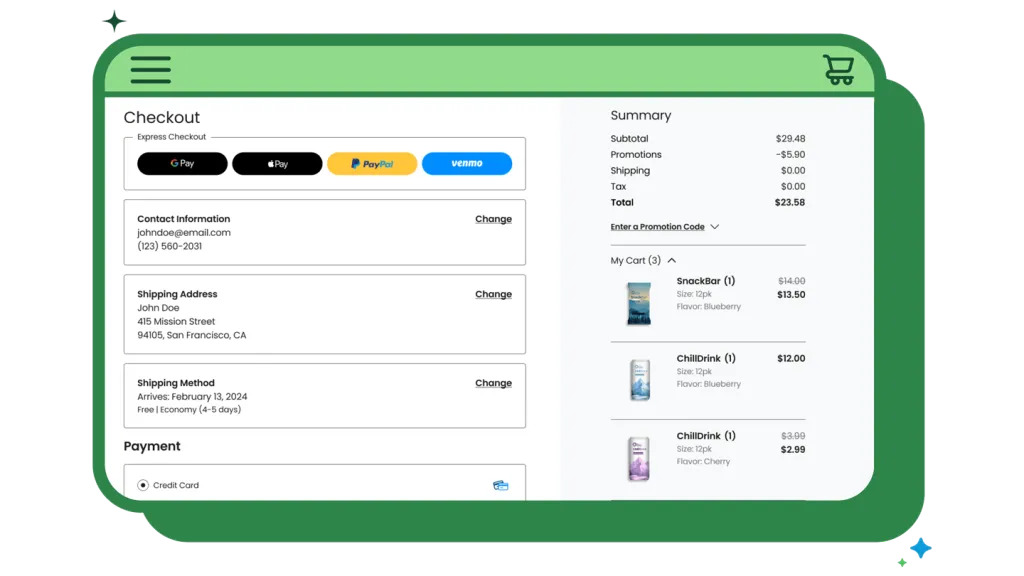
Shopify Plus stores must migrate from checkout.liquid to Checkout Extensibility to utilize the new one-page checkout and app-based customizations. To understand how to leverage this transition for maximum impact, explore our detailed guide on Shopify Checkout Extensibility CRO tactics.
- Prioritize Express Keys: Place Shop Pay, Apple Pay, and Google Pay at the very top of the checkout to enable one-tap purchasing.
- Address Autocomplete: Ensure Google Maps API or Shopify’s native address autocomplete is active to reduce keystrokes by up to 20%.
- Minimize Custom Fields: Audit your checkout for non-essential fields; every additional input field reduces conversion rates by approximately 1.5%.
What to Avoid: Do not use intrusive pop-ups or "spin-to-win" wheels during the checkout process, as these significantly increase cart abandonment on mobile devices. Operators seeking to customize the checkout UI without breaking the upgrade path should consult the official Shopify Checkout Extensibility documentation to implement Checkout UI Extensions correctly.
Technical Performance Audit: Mobile LCP and CLS Optimization
Mobile conversion rates drop by 0.3% for every 100ms of additional load time. Technical debt in heavy themes often causes layout shifts that frustrate mobile users.
- Eliminate Layout Shift (CLS): Reserve space for images and banners using CSS aspect-ratio properties to prevent content from jumping during load.
- Lazy Load Below-the-Fold: Use native browser lazy loading for images and iframes that are not in the initial mobile viewport.
- App Audit: Remove unused Shopify apps and their residual script tags, which frequently bloat the Total Blocking Time (TBT) on mobile processors.
To systematically resolve performance issues, use Shopify’s built-in Online Store Speed Report to identify specific liquid files or third-party scripts that are delaying the Time to Interactive (TTI). For a step-by-step technical walkthrough, see our resource on fixing Shopify Total Blocking Time, and monitor your metrics using Google Core Web Vitals guidelines.
Mobile Personalization Audit via Shopify Functions
Personalization on mobile should be automated rather than requiring user input. Use backend logic to handle complex rules seamlessly.
- Dynamic Discounting: Use Shopify Functions to automatically apply tiered discounts (e.g., "Spend $100, Save $10") without requiring a manual discount code entry. Developers can build custom rules using the Shopify Functions API.
- Geo-Targeted Content: Leverage Shopify Markets to show local currency and shipping expectations automatically based on the user's IP address.
- Custom Shipping Logic: Hide heavy-item shipping options for mobile users in specific regions to prevent sticker shock at checkout.
If you run a subscription model, personalizing the checkout and portal experience is vital. Check out our guide on subscription CRO and UX priorities to optimize recurring revenue flows.
Experiment Backlog: Speed, UX, Offer, Trust, and Personalization Tests
To build a sustainable growth engine, organize your optimization ideas into a structured testing backlog. Prioritize experiments based on their potential impact and implementation effort:
- Speed Tests: Minify critical CSS, optimize image delivery, and defer non-essential JavaScript.
- UX Tests: Compare a slide-out cart drawer against a direct-to-checkout flow on mobile devices.
- Offer Tests: Test free shipping thresholds (e.g., $50 vs. $75) to increase Average Order Value (AOV).
- Trust Tests: Experiment with the placement of security badges, reviews, and return policy guarantees near the primary CTA.
- Personalization Tests: Serve tailored product recommendations based on past browsing history using native Shopify tools.
Authoritative References
Use these official resources to verify platform-specific claims and implementation details before making commercial or technical decisions:
- Shopify Plus Platform Overview
- Shopify Functions Developer Documentation
- Shopify Checkout Extensibility Guide
- Google Search Central: Core Web Vitals
Optimize Your Shopify Plus Store Today
Ready to unlock hidden revenue on your Shopify Plus store? Let's identify your highest-impact conversion blockers. Contact me today for a comprehensive Shopify Plus CRO, SEO, or migration audit to optimize your mobile performance and scale your growth.
Related Shopify and Ecommerce Growth Guides
Continue with these related guides if you want to connect the strategy to implementation, SEO risk, performance, or conversion impact.
- Shopify Plus Conversion Strategy: UX, Speed & CRO Priorities
- Shopify Plus Conversion Strategy: Subscription CRO & UX Priorities
- Shopify B2B Technical SEO: Scale Wholesale Traffic
- Shopify Checkout Extensibility CRO: 7 Tactics to Boost Revenue
- Shopify Total Blocking Time Fix: 6 Steps to Faster Themes
Frequently Asked Questions
What are the primary metrics for a mobile CRO Shopify Plus audit?
Key metrics for a mobile CRO Shopify Plus audit center on technical performance and user interaction data that directly influence Revenue Per Visitor (RPV). Essential benchmarks include Largest Contentful Paint (LCP), which should remain under 2.5 seconds to prevent bounce-off, and Cumulative Layout Shift (CLS), which must stay below 0.1 to ensure visual stability during the mobile browsing experience. Analysts also track the 'Tap-to-Cart' ratio and the 'Checkout Completion' rate specifically for mobile-first payment methods like Shop Pay and Apple Pay. Because mobile users exhibit higher cognitive load, monitoring the 'Time to Interactive' (TTI) is critical; high-volume Plus stores should aim for a TTI under 3.5 seconds on 4G connections. Furthermore, analyzing the 'Search-to-Purchase' conversion rate helps determine if predictive search and mobile navigation menus are effectively reducing friction. By auditing these specific data points, Shopify Plus merchants can identify where technical debt or UI bottlenecks are causing mobile cart abandonment and implement high-impact optimizations.
How does Checkout Extensibility improve mobile conversion?
Checkout Extensibility replaces checkout.liquid, allowing Plus merchants to implement app-based UI extensions and one-page checkouts. This reduces friction by enabling faster loading times and native integration of express payment buttons like Shop Pay, which are proven to increase mobile conversion by reducing manual data entry.
Why is the 'thumb zone' important for Shopify Plus mobile design?
The thumb zone refers to the areas of a mobile screen most easily reached during one-handed use. By placing critical elements like the 'Add to Cart' button and navigation filters in the center or bottom of the screen, merchants reduce physical effort for the user, leading to higher engagement and lower abandonment rates.

Ecommerce manager, Shopify & Shopify Plus consultant with 10+ years of experience helping enterprise brands scale their ecommerce operations. Certified Shopify Partner with 130+ successful store migrations.