- The Architecture of Shop Posts: Beyond Basic Image Uploads
- Leveraging Meta-Data and Alt-Text for Shop App Algorithmic Discovery
- Engineering the Mobile Funnel: Shop Posts as a Shopify CRO Lever
- Integrating Shop Pay for Frictionless One-Tap Checkout from Feed
- Advanced Merchandising: Using Shop App Analytics to Inform Inventory Strategy
- A/B Testing Visual Assets within the Shop Ecosystem for Higher CTR
- Automating the Feed: Connecting Shopify Flow to Shop Post Updates
- Dynamic Product Linking and Real-time Availability Sync Protocols
- The Future of Discovery: Predictive Merchandising and Zero-Party Data in the Shop App
- Related Reading
The Architecture of Shop Posts: Beyond Basic Image Uploads
What are Shop Posts? Shop Posts are shoppable visual content assets within the Shopify Shop App ecosystem that link media directly to product variants. They function as a native discovery layer, leveraging merchant-provided metadata and customer behavior data to surface products to over 100 million registered users, facilitating high-intent mobile browsing and instant checkout.
Shop Posts represent a shift from passive social media feeds to active commerce environments. While Instagram or TikTok requires a "link in bio" or third-party browser redirect, Shop Posts exist within the same environment as the customer’s payment credentials and order history.
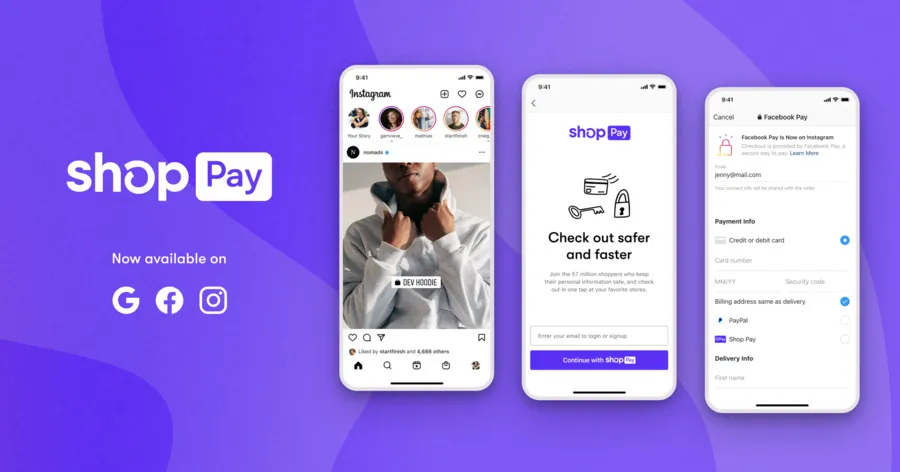
Shop Pay one-tap checkout mobile interface
The technical architecture of a Shop Post consists of three primary layers: the media asset (image or video), the product entity mapping (SKU-level tagging), and the metadata schema. Treating these posts as a technical data layer allows for more precise visual merchandising across the mobile ecosystem.
Effective architecture requires high-resolution assets optimized for mobile aspect ratios, typically 4:5 or 9:16. These assets must be mapped to specific product IDs, allowing the Shop App to pull real-time pricing and inventory status directly from your Shopify backend.
Leveraging Meta-Data and Alt-Text for Shop App Algorithmic Discovery
The Shop App discovery engine relies heavily on structured data to categorize and recommend content. Unlike traditional SEO, which focuses on web crawlers, Shop App discovery focuses on user intent signals and product relationships within the Shopify ecosystem.
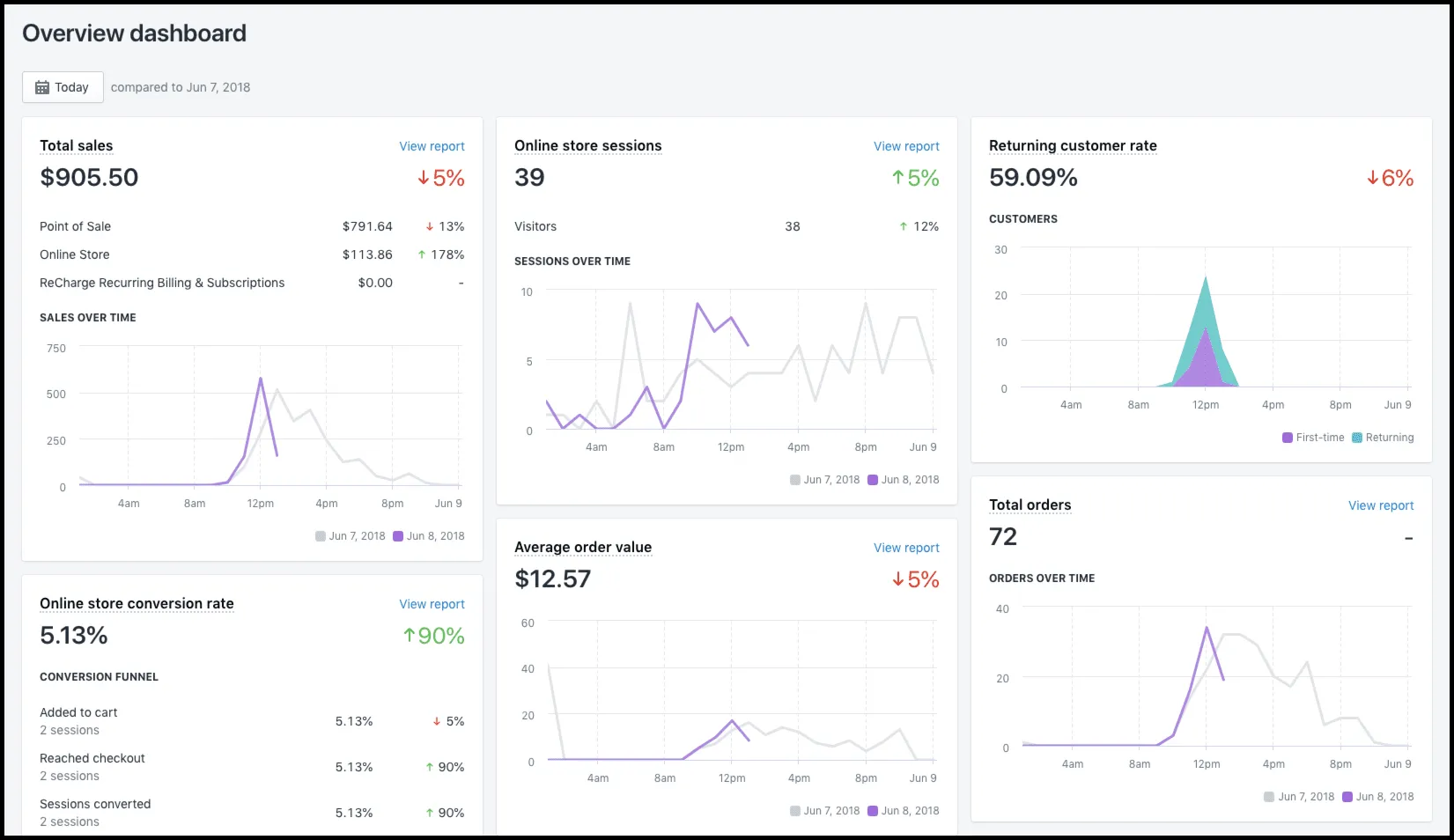 Shopify Shop App analytics dashboard metrics
Alt-text in Shop Posts serves a dual purpose: accessibility and algorithmic indexing. Use descriptive, keyword-rich alt-text that includes the product category, material, color, and use-case to improve your app-based discovery rankings.
- Primary Keywords: Include the exact product name and category as defined in your Shopify Admin.
- Contextual Tags: Use descriptive language that mirrors how users search (e.g., "waterproof hiking boots for winter").
- Entity Association: Mention related products to help the algorithm build a "frequently bought together" profile for your feed.
Metadata goes beyond the caption. Every interaction—likes, shares, and clicks—feeds back into the Shop App’s recommendation engine, influencing which users see your content in their "For You" or "Trending" feeds.
Engineering the Mobile Funnel: Shop Posts as a Shopify CRO Lever
Mobile conversion rates historically lag behind desktop due to friction in navigation and checkout. Shop Posts serve as a critical Shopify CRO lever by collapsing the traditional five-step funnel into a three-step interaction: Discover, View, and Buy.
By optimizing the visual hierarchy of your Shop feed, you reduce the cognitive load on the shopper. High-performing feeds prioritize clear product utility over abstract lifestyle imagery, ensuring the user understands the value proposition within milliseconds of scrolling.
To maximize your return on investment, consider professional Shopify CRO Consulting to audit how your Shop App presence integrates with your broader mobile strategy. A cohesive strategy ensures that your Shop Posts are not operating in a vacuum but are actively driving Customer Lifetime Value (CLV).
Integrating Shop Pay for Frictionless One-Tap Checkout from Feed
The primary advantage of the Shop App is the native integration of Shop Pay. This feature allows for a one-tap checkout experience that bypasses the traditional cart and shipping information forms.
When a user engages with a Shop Post, the "Buy Now" button triggers the Shop Pay interface immediately. This reduces drop-off rates by eliminating the need for manual data entry on a small mobile screen, which is a leading cause of cart abandonment.
Merchants should ensure that Shop Pay is active and that all product variants are eligible for accelerated checkout. This integration is the cornerstone of Mobile conversion rate optimization, providing a seamless transition from brand storytelling to completed transaction.
Advanced Merchandising: Using Shop App Analytics to Inform Inventory Strategy
Shop App Analytics provides a window into "top-of-funnel" mobile behavior that is often obscured in standard Google Analytics reports. By analyzing reach, engagement, and conversion metrics specifically within the Shop ecosystem, merchants can identify emerging trends before they hit the main storefront.
If a specific Shop Post is seeing high engagement but low conversion, it may indicate a pricing mismatch or an inventory stock-out on popular sizes. Conversely, high conversion on low-reach posts suggests a niche product that warrants a higher marketing spend or a featured placement on the homepage.
Use these insights to inform your inventory strategy. Products that trend within the Shop App often signal a younger, mobile-first demographic's preferences, allowing you to adjust procurement cycles and safety stock levels accordingly.
A/B Testing Visual Assets within the Shop Ecosystem for Higher CTR
While the Shop App does not yet offer a native A/B testing tool for posts, sophisticated operators use sequential testing and "proxy" collections to measure performance. This involves running specific visual styles for set periods and measuring the CTR (Click-Through Rate) and conversion delta.
- Define a baseline period (e.g., 14 days) using standard lifestyle photography.
- Introduce a new visual variable, such as user-generated content (UGC) or high-contrast studio shots.
- Monitor the "Shop App" traffic source in your Shopify Analytics dashboard.
- Calculate the conversion rate per 1,000 impressions to determine the winning asset.
- Scale the winning visual style across all related product categories.
Testing should focus on the "hero" image—the first thing a user sees in the feed. Small changes in lighting, background color, or product placement can lead to double-digit improvements in engagement metrics.
Automating the Feed: Connecting Shopify Flow to Shop Post Updates
Manual content management is the bottleneck of scaling a mobile commerce presence. Large-scale merchants use Shopify Flow automation to ensure their Shop feed remains dynamic and synchronized with their actual business state.
Automation allows you to trigger Shop Post updates based on specific backend events, such as a product returning to stock or a new collection launch. This ensures that your mobile merchandising is always relevant and that you aren't wasting impressions on out-of-stock items.
For enterprise-level automation and complex workflow design, engaging with Shopify Plus Consulting can help bridge the gap between standard app features and custom business logic. Automation is the key to maintaining a "fresh" feed that encourages repeat visits and higher Post-purchase engagement.
Dynamic Product Linking and Real-time Availability Sync Protocols
The technical integrity of your Shop Posts depends on the accuracy of your product links. A broken link or an incorrect price display destroys consumer trust and wastes precious mobile real estate.
Shopify utilizes a real-time sync protocol that connects your product catalog to the Shop App. However, merchants using Shopify Markets must be particularly careful. Ensure that your Shop Posts are configured to show the correct currency and localized availability based on the user's geographic location.
Advanced merchants use custom metafields to control which products are pushed to the Shop App. By creating a "Shop-App-Eligible" boolean field in your Shopify Admin, you can programmatically filter which items appear in the feed, ensuring only your highest-margin or most "shoppable" products are featured.
The Future of Discovery: Predictive Merchandising and Zero-Party Data in the Shop App
The next evolution of the Shop App lies in predictive merchandising. Shopify is increasingly using machine learning to predict what a user might want to buy based on their previous interactions across all Shop-enabled stores.
This ecosystem relies heavily on Zero-party data—information that customers intentionally and proactively share with a brand. This includes preferences set within the Shop App, such as favorite brands, sizes, and interests. Merchants who encourage users to "Follow" their store in the Shop App gain access to a direct, algorithmically-boosted channel to these high-intent users.
Integrating Shopify Inbox integration into this discovery loop allows for real-time conversational commerce. If a user discovers a product via a Shop Post but has a question about fit, they can initiate a chat immediately. This interaction provides the merchant with valuable qualitative data that can further refine the merchandising strategy.
The future of shopify shop app merchandising is not just about showing products; it is about creating a self-optimizing engine. By treating every Shop Post as a data point, merchants can build a feedback loop that informs product development, marketing spend, and inventory management, all while providing a frictionless experience for the mobile-first consumer.
Frequently Asked Questions
What are Shop Posts in the Shopify ecosystem?
Shop Posts are shoppable visual assets (images or videos) within the Shopify Shop App that allow merchants to tag specific product variants. They serve as a native discovery layer, enabling users to browse and purchase products without leaving the app environment.
How do Shop Posts improve Shopify CRO?
Shop Posts significantly enhance Shopify CRO (Conversion Rate Optimization) by drastically reducing the friction inherent in mobile commerce. Unlike traditional social media platforms that require multiple redirects and manual data entry, Shop Posts operate within a unified ecosystem where the user's payment credentials, shipping addresses, and order history are already securely stored via Shop Pay. This architectural advantage allows merchants to collapse the standard five-step marketing funnel—awareness, interest, consideration, intent, and purchase—into a streamlined three-step interaction: discovery, product viewing, and one-tap checkout. By utilizing high-resolution 4:5 or 9:16 visual assets mapped to specific SKU-level metadata, brands can provide immediate utility and real-time inventory transparency. This seamless transition from visual inspiration to completed transaction eliminates the common drop-off points associated with mobile browser navigation and complex checkout forms, leading to measurable increases in mobile conversion rates and customer lifetime value.
Can I automate Shop Post updates?
Yes, high-scale merchants can use Shopify Flow to automate Shop Post updates. This allows you to trigger content changes based on inventory levels, new product launches, or specific customer segments, ensuring your mobile feed remains dynamic and accurate.

Ecommerce manager, Shopify & Shopify Plus consultant with 10+ years of experience helping enterprise brands scale their ecommerce operations. Certified Shopify Partner with 130+ successful store migrations.